How to Get New York Times Access through LCPL
You can also find this link on our full list of databases and on our full list of available online newspapers.
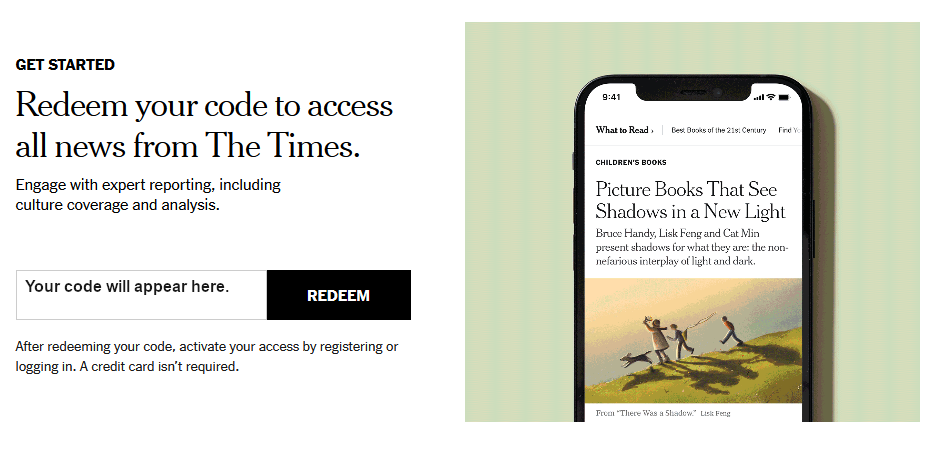
2: You will be taken to a page with a special code for free access for the next 24 hours. Click REDEEM.
After 24 hours, you can return to our website and repeat these steps to get another code.
Still Have Questions?
If you're having trouble gaining access, please contact the library and we'll do our best to help!
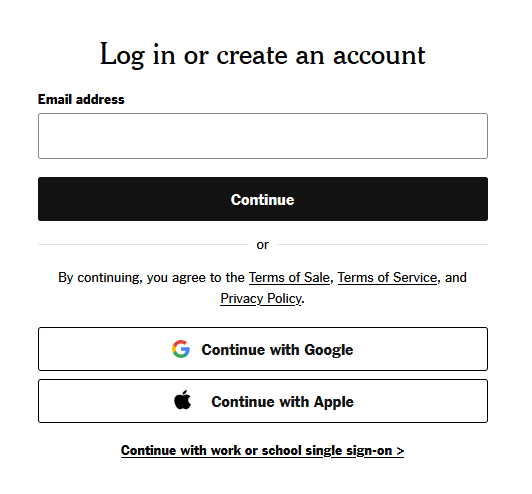
3. After you click 'redeem', you will be prompted to enter your email address or to log in to the New York Times using a Google, Facebook, or Apple account.
If you log in using your email address and you do not already have a New York Times account, you will be prompted to create a password.
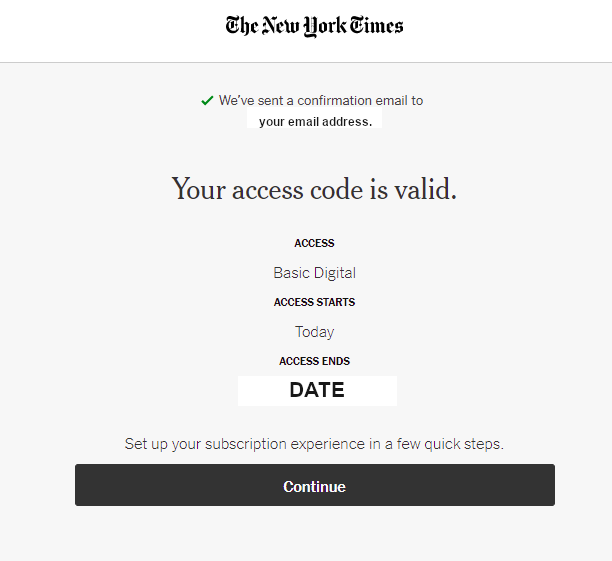
4. Once you have logged in, you will receive confirmation that your code is valid. Click Continue to begin reading the New York Times.
If your account is new, you will be taken through a few set-up steps. You may choose whatever options you like, or skip set-up entirely to begin reading.